Glorek One · Operations platform
One system runs every Glorek site
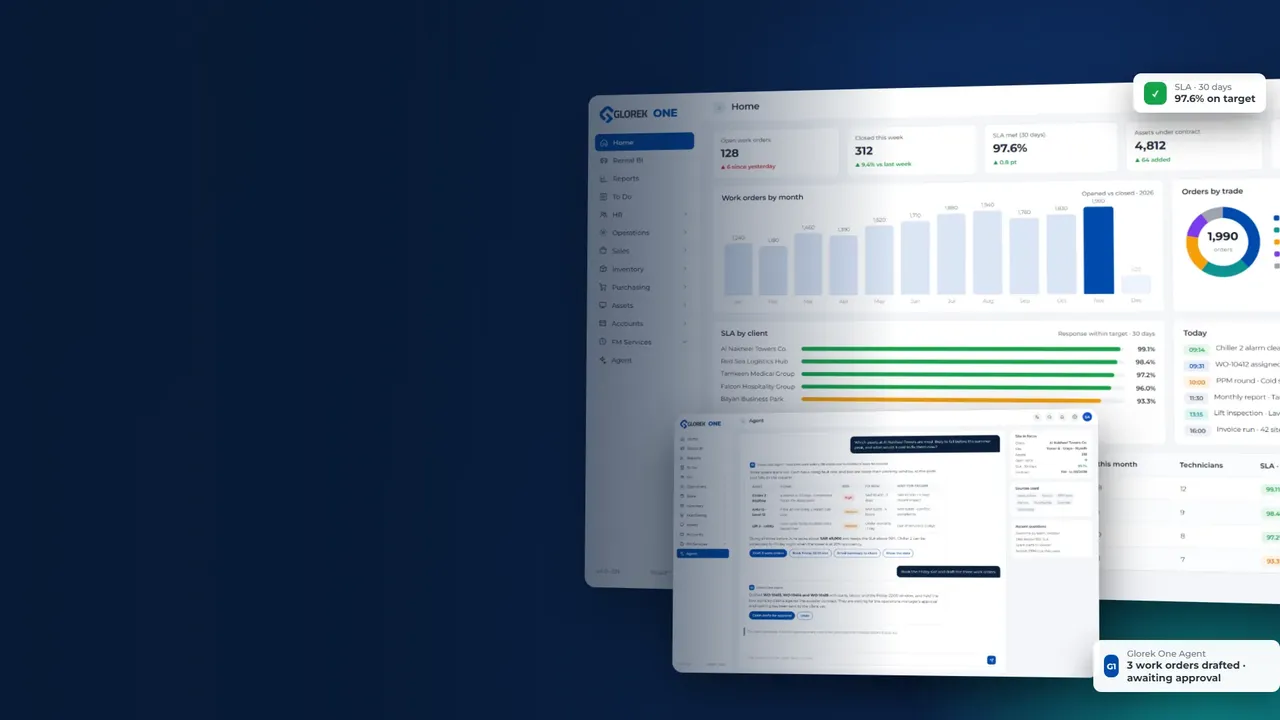
Work orders, assets, workforce, sales, inventory and accounting share a single record. Built in-house for facility management across Saudi Arabia and the UAE, and used every day by Glorek's own teams.
Trusted by






















Since 2016
Running Glorek's own operations
2 countries
Saudi Arabia and the UAE on one database
9 modules
One sign-in, one set of permissions
English · Arabic
Every screen in both languages
60+ sites
Client sites live today
ZATCA Phase 2
E-invoices cleared as they are issued
Most facility software stops at the work order. Glorek One keeps going to the invoice and the ledger.
Live visibility for the client
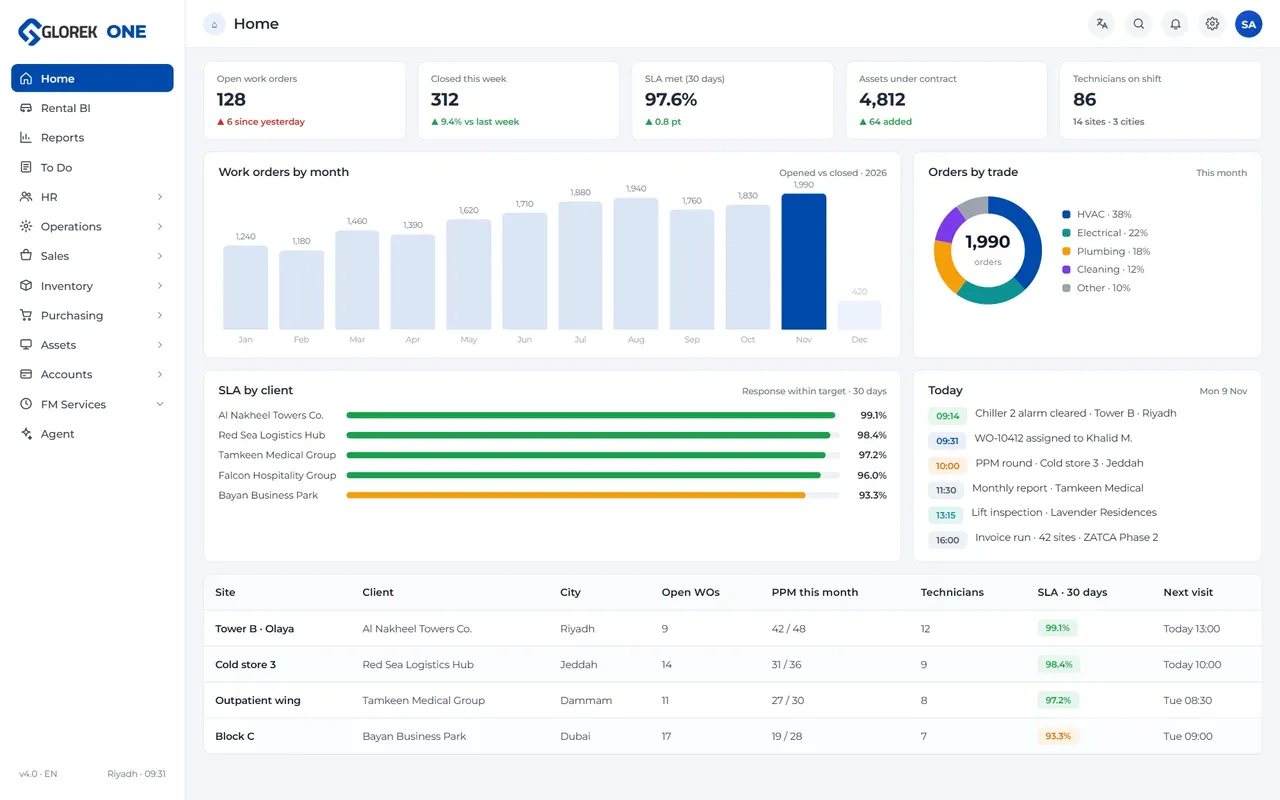
Clients on facility management and O&M contracts sign in and see their own work orders, SLA clocks, technician notes and proof photos as they happen. No weekly PDF to wait for.
Accountability by design
Every request has an owner, an SLA timer and an approval path. Closure needs proof. Journals lock once posted. Two-factor sign-in is required for every account, including Glorek's own staff.
Numbers that reconcile
Operations, inventory, purchasing, sales and accounting read the same tables. Cost per work order, stock issued to a job and the ZATCA-compliant invoice all come from one record.
Nine modules. One sign-in. One set of permissions.
OPOperations
Client orders, work orders, SLA tracking, technician assignment, proof-of-work and closure reports across any number of sites.
- Work orders
- Client orders
- SLA timers
- Approvals
- Proof photos
ASAssets
Operating, custodial and communal asset registers with QR tags, linked work-order history and lifecycle cost.
- Asset register
- QR / barcode
- PPM schedules
- MTTR · MTBF
HRHR & workforce
Employees, service providers, deployments, leave, warning letters, payroll and documents for a distributed workforce.
- Employees
- SP requests
- Leave
- Payroll
- Documents
- Jobs & hiring
SASales
Leads from the website land here automatically. Estimates, quotations and invoices follow the same client record.
- Leads
- Estimates
- Quotations
- Invoices
- Credit notes
INInventory
Materials, products and stock by warehouse, issued to work orders so job cost is real, not estimated.
- Materials
- Products
- Stock by warehouse
- Tags
PUPurchasing
Vendors, suppliers and purchase requests with the approval chain your finance team already expects.
- Vendors
- Suppliers
- Vendor requests
ACAccounting
Journal entries, expense accounts, petty cash and wallets. ZATCA e-invoicing built in. Journals lock once posted.
- Journals
- Expense accounts
- Petty cash
- ZATCA
- Financial year close
BIRental BI & reports
Fleet utilization for rented equipment, plus cross-module reports you can filter by client, site, team or period.
- Rental BI
- Reports
- Exports
AIAgentnew
An AI colleague that reads every module. Ask it anything in English or Arabic, let it triage requests, predict failures and write the monthly report. Governed by a rulebook your admin controls.
- Rulebook
- Predictive maintenance
- Auto-triage
- Report writer
From a tenant's phone call to the audit file, in four timestamps
Request logged
Raised by the client portal, a tenant, or a Glorek supervisor. Site, asset and priority set. The SLA clock starts. Owner: the site supervisor.
Approved and assigned
Work types above a threshold route to an approver. The technician gets the job on the mobile app with the asset's history attached. SLA: respond in 30 minutes, resolve in 4 hours.
Executed with proof
Notes, before-and-after photos and materials issued from stock are recorded on site. Stock and job cost update at the same moment. 3 photos, 2 parts issued.
Closed, reported, billed
Closure needs the client's acknowledgement or a supervisor override. The order joins the monthly report and the invoice line, and the record is locked. Resolved in 2 h 54 min, SLA met.
New · Glorek One Agent
The first facility manager that has read every work order you ever closed
Example
Which assets at the Riyadh mall are likely to fail before Ramadan, and what would it cost to replace them now versus after they fail?
Three assets at the Riyadh mall show the pattern that preceded failures across your portfolio:
| Asset | Signal | Risk by 15 Feb | Replace now | After failure |
|---|---|---|---|---|
| Chiller 2 (Tower B) | 4 trips in 60 days, compressor amps rising | High | SAR 186,000 | SAR 241,000 + 3 days downtime |
| AHU-11 (Food court) | Vibration notes on the last 3 PPMs | Medium | SAR 42,500 | SAR 58,000 |
| Lift 3 (Car park) | Door sensor replaced twice, same fault | Medium | SAR 9,800 | SAR 9,800 + tenant complaints |
Replacing Chiller 2 now is cheaper and avoids the peak-season outage. Shall I draft the quotation for the client and a purchase request for the compressor?
- Draft quotation
- Create purchase request
- Show the evidence
Predicts failures before tenants notice
Learns from every closed work order, PPM note and parts issue in your portfolio, then flags the assets drifting toward the same pattern, with a cost comparison for acting now or later.
Triages requests from anywhere
A tenant's WhatsApp voice note in Arabic becomes a classified work order with site, asset, priority and SLA in seconds. Duplicates are merged. Emergencies jump the queue.
Dispatches like your best supervisor
Matches each job to the nearest technician with the right skill, the right parts in their van and time left in the day. Re-plans the moment an emergency lands.
Checks the proof
Reads before-and-after photos and asks for another when the picture does not match the job, so a closed work order means the work was done.
Writes the monthly report
Turns the month's numbers into a report a client director can read in five minutes, in English and Arabic, with the reasons behind every miss.
Watches money and compliance
Spots invoice lines that break a contract rate, duplicate supplier bills, expiring certificates and iqamas, and overtime that is about to breach labor rules.
Governed, not loose. The Agent never sees data the asking user cannot see. Every action it proposes is approved by a person before it happens. Your admin's rulebook sets what it may suggest, draft or do on its own, and every answer links to the records it used.
Included with every facility management and O&M contract
You do not buy software to work with Glorek. Your team gets a login on day one and sees the same screens our supervisors use, limited to your sites.
Your dashboard. Open orders, SLA compliance, due today, awaiting your approval.
Raise and track requests. From a desk or a phone, in English or Arabic, with photos.
Approve with one tap. Quotes for out-of-scope work reach the right person with the asset's history attached.
A monthly report, generated not written. SLA, backlog, first-time fix and cost per work order, straight from the records.
Your assets, your data. Export your register and history at any time. Hosted on dedicated servers, backed up every day.
A look inside
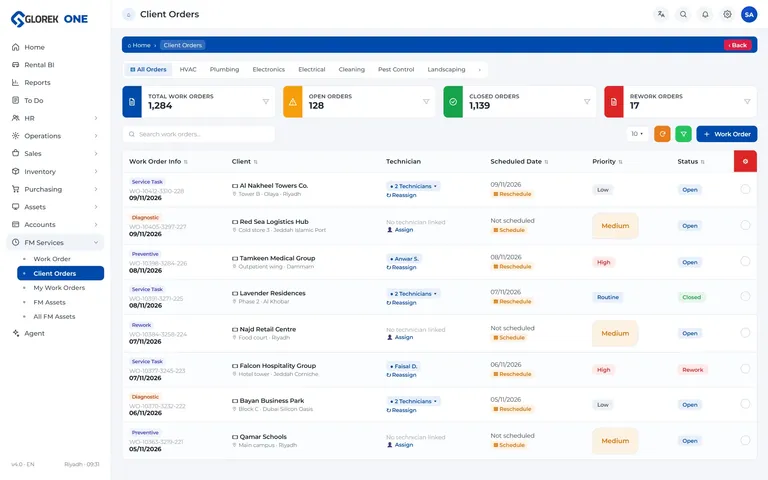
Client orders
Every client request in one list, with status, SLA and the next step.
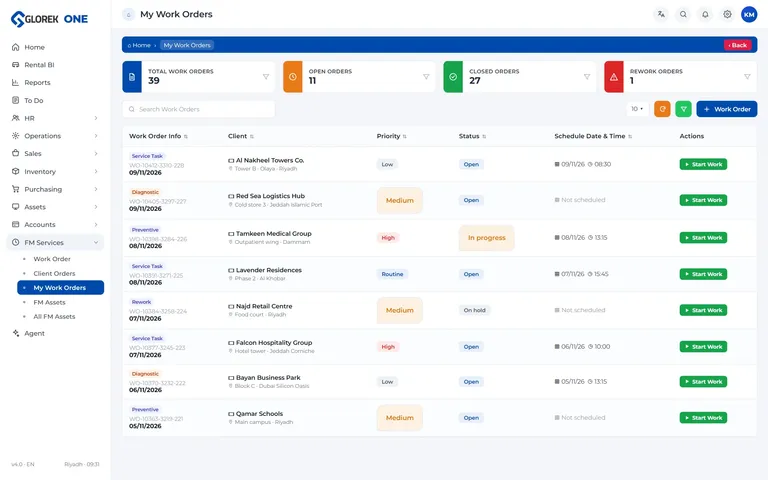
My work orders
What each technician has today, with progress, notes and proof photos.
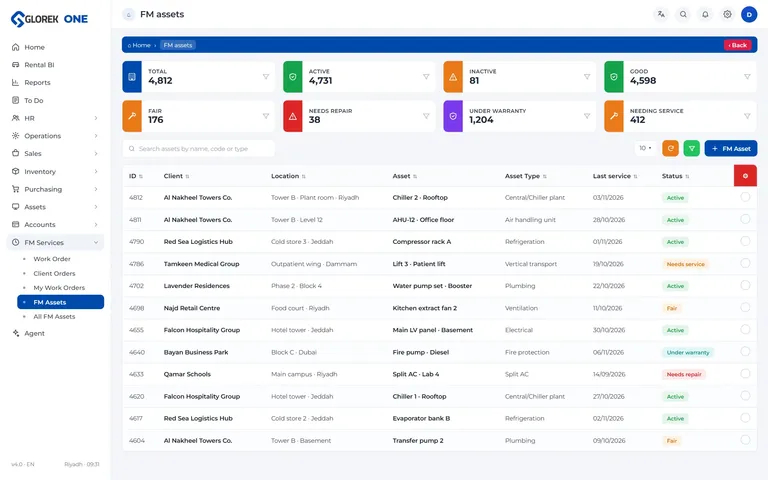
Assets
The register of AC units, generators, lifts and more, with each one’s history.
License it for your own team
Not a Glorek client? Run your own operations on Glorek One
Site
Price on requestper site, per month
Up to 250 assets per site. All modules, unlimited users, Arabic and English.
- Client portal and mobile app
- ZATCA Phase 2 e-invoicing
- Agent: questions and reports
- Email support, same business day
Portfoliomost chosen
Price on requestper site, per month
Five sites or more, up to 1,000 assets per site. Group dashboard across companies and countries.
- Everything in Site
- Agent: predictions, triage and dispatch
- Data load done by Glorek
- Named account manager, WhatsApp support
Enterprise
Customannual agreement
Unlimited assets, dedicated hosting, integrations with your ERP and single sign-on.
- Everything in Portfolio
- Dedicated server and backup schedule
- Custom rulebook and approval flows
- On-site onboarding in Saudi Arabia and the UAE
Facility management and O&M clients of Glorek do not pay for Glorek One; it is included in the contract.
Built here, for here
Arabic first, properly
Every screen, report and notification in Arabic and English with true right-to-left layout. Switch per user, not per company.
ZATCA Phase 2, live
Invoices and credit notes are cleared with ZATCA as they are issued, with QR codes and 15% VAT handled for you.
Two countries, one view
Separate companies, currencies and tax rules under one group dashboard. Add a country without adding a system.
Field-ready mobile app
Technicians work from an Android and iOS app that keeps going on poor site signal and syncs proof when it reconnects.
Two-factor sign-in for everyone
Not optional, not per role. Role and module permissions on top: a client sees their sites, a technician their jobs, finance the ledger.
Locked records, full audit trail
Posted journals and closed work orders cannot be edited silently. Who created, approved, edited and closed, with timestamps. Daily off-site backups.
KPIs on the dashboard from day one
SLA compliance %
Response and resolution against contract targets
First-time fix rate
Repeat visits and the assets behind them
Work-order backlog
By age, site, team and priority
Cost per work order
Labor, parts and overhead from real postings
MTTR / MTBF
Reliability per asset class and site
Workforce deployment
Who is where, on which contract, today
Common questions
Do I need to buy Glorek One to work with Glorek?
No. Facility management and O&M clients get access as part of the contract. It is how we deliver the service, not an add-on.
Can we use Glorek One for our own teams, without a Glorek service contract?
Yes. Licenses are priced per site and scale with the number of assets you manage. See the plans above and ask us for a quote.
Where is our data stored and can we export it?
On dedicated servers managed by Glorek, backed up every day. You can export your asset register, work-order history and reports at any time, and your data is deleted on request when a license ends.
Does it work with our existing ERP or accounting system?
Glorek One has its own accounting module with ZATCA Phase 2 built in. If you keep your ERP, journals and invoices export in standard formats, and Enterprise plans include a direct integration.
How long does onboarding take?
A single site is usually live within a week. Portfolios take two to four weeks because Glorek's team loads your sites, assets and users for you and trains supervisors on site.
Is there a mobile app?
Yes. Technicians and supervisors use the Glorek One app on Android and iOS for assigned work, proof photos and approvals.
See your sites in Glorek One
A 30-minute walkthrough with one of your real sites set up as the example. English or Arabic.